Order On WhatsApp for Woocommerce
Allow Customers to Place orders on Whatsapp
Improve store sales by allowing customers to place orders through WhatsApp. The WooCommerce WhatsApp order plugin also lets you display a “Share on WhatsApp” button on multiple pages.
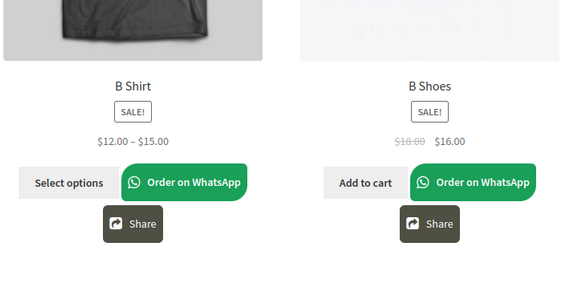
Let customers place orders on WhatsApp from shop, product, and cart pages. The checkout form will appear in a popup when the customer clicks the “Order on WhatsApp” button whether he is on the shop, product, or cart page. Fill out the checkout form and proceed to place an order on WhatsApp. Customers can also place orders through WhatsApp from the checkout page by clicking the “Order on WhatsApp” checkbox.
The WooCommerce WhatsApp order button can be added to specific or all products or categories. The plugin works with both simple and variable products. You can also add personalized text and customize the color and shape of the buttons.
By enabling smooth ordering over WhatsApp, the “Order on WhatsApp for WooCommerce” plugin improves user experience and expedites customer communication. It makes transactions faster, increases consumer trust through tailored interactions, and opens up new sales channels by leveraging WhatsApp messaging’s massive user base.
Features List
Let customers place order on WhatsApp
Allow customers to share your products on WhatsApp
Displays checkout form in a popup on the shop and product page
Option to enable WhatsApp order button only for logged-in customers
Option to create orders on the admin side when placed through WhatsApp
Choose the default status for orders from the admin side
Display the WhatsApp order and share buttons on the shop, product, and cart page
Add the order on WhatsApp button for specific products or categories
Customize order on WhatsApp and share button
Prefilled messages for WhatsApp orders
Supports variable products
Enable the WhatsApp option on the checkout page
Customers will receive a notification upon order confirmation
Send notification to customers when order status is changed
Option to hide Add to cart button on product & shop page
Option to hide WhatsApp button on desktop
Email notifications for WhatsApp order
This Plugin is fully compatible with HPOS(High-Performance Order Storage) and Multisite.
Let Customers Place Orders on WhatsApp from Multiple Pages
Make it easy for customers to place orders with the WooCommerce WhatsApp order plugin. Display the “Order on WhatsApp” and “Share Product” buttons on multiple pages of your website. You can add the buttons on the shop, product, and category pages. A checkout form popup will appear on these pages to proceed to place an order on WhatsApp. Customers can also select “Order on WhatsApp” on the checkout page.
Get All Checkout Details on WhatsApp
When a customer places an order on WhatsApp, all checkout form details are automatically passed in the WhatsApp message. This includes the user’s personal information, product details, and shipping information.
Enable “Share on WhatsApp” Button
The order on WhatsApp for WooCommerce plugin allows you to display a “Share on WhatsApp” button on the shop, product, and cart pages. This way customers can easily share products with their family and friends via WhatsApp.
Enable “Share on WhatsApp” Button
Send A “Pay Now” Link on WhatsApp
Make payment easy for the customers by sending a “Pay Now” link on their WhatsApp numbers with the WooCommerce order on WhatsApp plugin. In case the payment is pending, you can share a payment link on WhatsApp to make it easy for customers to pay.
Add Multiple WhatsApp Numbers for Different Stores
Easily cater to more customers by adding multiple WhatsApp order numbers for each store. You can add more than one WhatsApp contact number by clicking the “Add Another” button. You can set the name, contact number, and status for each WhatsApp contact number. You can also set the label for the WhatsApp contact number input.
Select “Order on WhatsApp” as Payment Method
The WooCommerce WhatsApp order plugin allows customers to select “Order on WhatsApp” as a payment method. Upon selecting, the user will be redirected to WhatsApp with a “”Pay Now” link. Using this link the customer can complete the order by selecting the desired payment method.
Works With Both Simple & Variable Products
The WooCommerce Order on WhatsApp plugin works well with both simple and variable products. Making it easy for you to sell variable products.
Works With Both Simple & Variable Products
Restrict “Order on WhatsApp” Button for Specific Products or Categories
Display the “Order on WhatsApp” button on all pages or restrict them to specific products or categories. Click on the “Apply on All Products” checkbox to display the button on all products. You can also select specific products or categories from the dropdown menu.
Restrict “Order on WhatsApp” Button for Specific Products or Categories
Customize “Order on WhatsApp” Button
The WooCommerce WhatsApp order plugin provides you the flexibility to fully customize the “Order on WhatsApp” button. You can add customize teh following:
Order on WhatsApp button text
Padding and border radius of the WhatsApp order button
The background color and text color of the button
WhatsApp button border width on the shop, product, and cart page
You can also select the placement of the “Order on WhatsApp” button. Choose to display the button before or after the cart.